
What is Index Bloat? Causes, SEO Impact & How to Fix It
1. Introduction to Index Bloat
In the world of modern SEO, indexing plays a crucial role in determining whether your website pages appear in search engine results or remain invisible online. Search engines like Google use automated bots called crawlers to discover, scan, and store web pages in their massive database known as the search index. Once pages are indexed, they become eligible to rank for relevant search queries.
However, not every page on a website deserves to be indexed. This is where the concept of What is Index Bloat becomes extremely important in 2026. Many websites unknowingly allow thousands of low-value, duplicate, or unnecessary URLs to enter Google’s index. As a result, search engines waste crawl resources on irrelevant pages instead of focusing on important business pages, blogs, products, or services.
Index Bloat SEO has become one of the biggest Technical SEO challenges because search engines today prioritize quality over quantity. With the rise of AI-driven search experiences such as Google AI Overviews and Generative Engine Optimization (GEO), websites are expected to maintain a clean, organized, and valuable indexing structure. Search engines no longer reward websites simply because they have more pages. Instead, they evaluate whether indexed pages actually provide unique value to users.
A bloated index can negatively impact rankings, crawl efficiency, user experience, and even AI visibility. If search engines discover too many weak or duplicate pages, they may lose trust in the overall quality of the website. This directly affects organic traffic growth and reduces ranking potential for important pages.
Technical SEO experts now focus heavily on crawl optimization, index management, sitemap hygiene, and AI-ready content structures. Whether it is an ecommerce store, WordPress website, news portal, or business site, controlling indexed pages has become essential for sustainable SEO success.
Understanding What is Index Bloat is therefore no longer optional. It is a critical part of Technical SEO and AI Search Optimization strategies for businesses that want long-term organic visibility in 2026 and beyond.
2. What is Index Bloat?
Index Bloat refers to a situation where search engines index too many low-quality, duplicate, thin, or unnecessary pages from a website. Instead of indexing only valuable content, Google ends up storing irrelevant URLs that provide little or no SEO value.
In simple terms, Index Bloat happens when the number of indexed pages on a website becomes much larger than the number of pages that actually deserve to rank.
For example, a business website may only have 150 useful pages, but Google may index 5,000 URLs due to filters, duplicate categories, search result pages, tracking parameters, pagination issues, and auto-generated URLs. This creates Website Indexing Problems and weakens overall SEO performance.
Useful indexed pages typically include:
- Service pages
- Product pages
- High-quality blogs
- Landing pages
- Category pages with valuable content
Low-value indexed pages often include:
- Empty tag archives
- Duplicate product variations
- Internal search result pages
- Thin content pages
- Filter URLs
- Auto-generated author pages
- Session-based URLs
Google Indexing works automatically, meaning Googlebot continuously discovers URLs through internal links, XML sitemaps, backlinks, and navigation systems. If websites fail to control indexing properly, search engines start indexing pages that should never appear in search results.
A common real-world example of Index Bloat SEO can be seen in ecommerce websites. Suppose an online clothing store has filters for size, color, brand, price, and sorting. Every filter combination can create a new URL. Over time, Google indexes thousands of nearly identical pages with minimal differences.
Similarly, WordPress websites often suffer from indexed tag pages, media attachment pages, and archive pages that offer little SEO value.
The main problem is not the existence of these URLs — the problem begins when search engines index them unnecessarily.
Understanding the difference between valuable Indexed Pages and low-quality URLs is the foundation of fixing Google Indexing Issues and improving overall Technical SEO performance.
3. How Google Crawling & Indexing Works
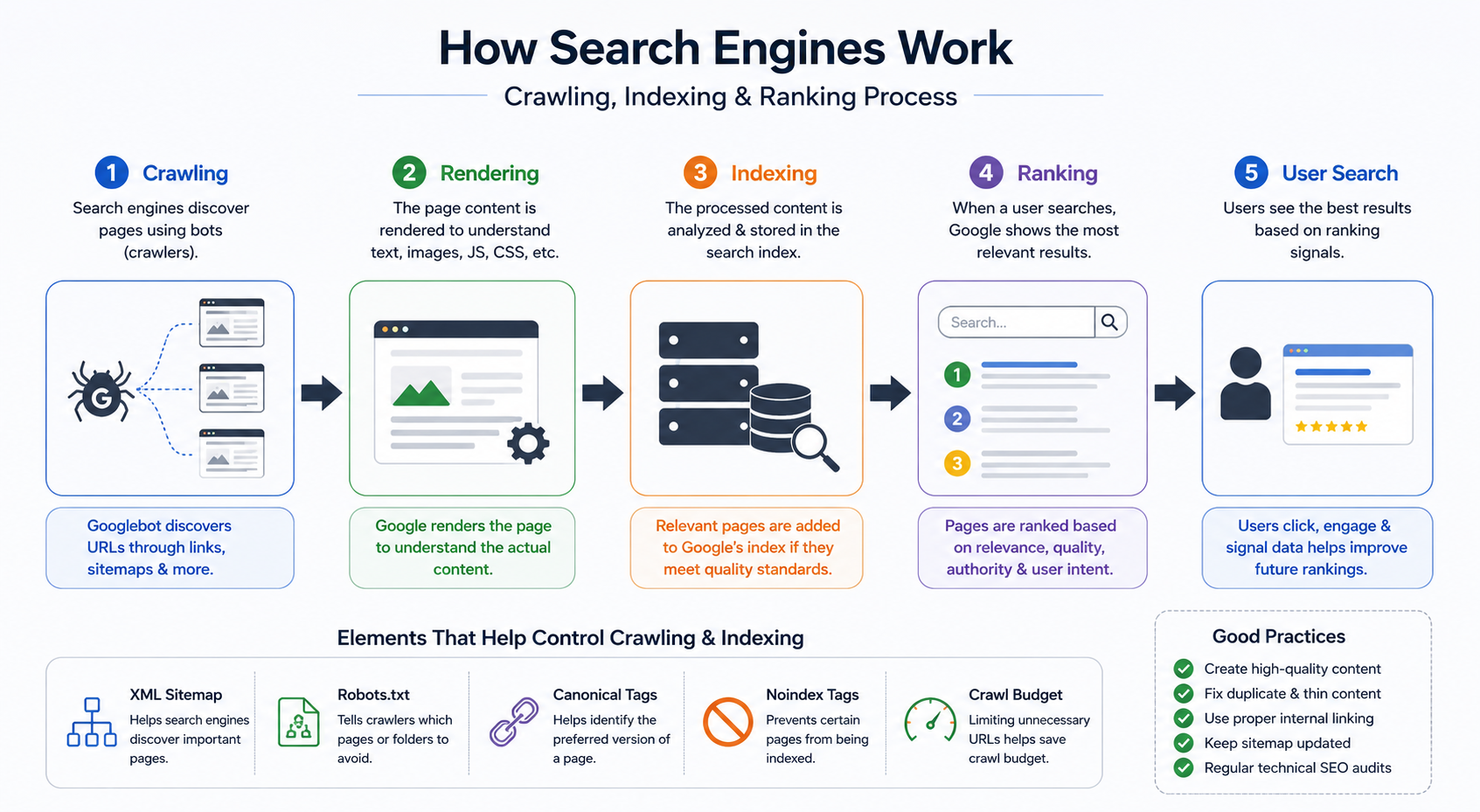 To understand Crawl Budget Optimization and Index Bloat SEO, it is important to first understand how Google Crawling and Website Indexing actually work.
Search engines use automated bots called crawlers or spiders to discover web pages across the internet. In Google’s case, this crawler is known as Googlebot.
The process generally happens in four stages:
1. Crawling
Googlebot visits websites and follows internal and external links to discover new pages. It also reads XML sitemaps submitted through Google Search Console.
Every website has a limited Crawl Budget, which refers to the number of pages Googlebot is willing to crawl within a certain timeframe. Large websites with poor URL structures often waste this budget on useless pages.
2. Rendering
After crawling a page, Google renders the content to understand JavaScript, layouts, images, and user-facing elements. Modern websites using React, JavaScript frameworks, and dynamic elements require proper rendering optimization.
3. Indexing
Once Google understands the page, it decides whether the content should be added to its search index. Not all crawled pages get indexed. Pages with thin content, duplicate information, or low value may be ignored.
However, when websites fail to guide Google correctly, many unnecessary pages still get indexed, causing Index Bloat.
4. Ranking
Indexed pages are then evaluated for rankings based on relevance, authority, quality, user experience, entities, and search intent.
Several Technical SEO elements help control crawling and indexing:
XML Sitemap
An XML sitemap tells search engines which pages are important and should be indexed. A clean sitemap improves crawl efficiency.
Robots.txt
The robots.txt file helps block crawlers from accessing unnecessary sections of the website, such as admin pages or filtered URLs.
Canonical Tags
Canonical tags tell search engines which version of a page is the primary version when duplicate content exists.
Noindex Tags
Noindex directives prevent specific pages from entering Google’s index while still allowing crawling if needed.
One major misconception in SEO is believing that every page should be indexed. In reality, search engines prefer websites with fewer but highly valuable pages. Clean indexing improves trust, crawl efficiency, and ranking potential.
This is why Crawl Budget Optimization and proper Website Indexing management have become critical components of modern Technical SEO and AI Search Optimization strategies.
4. Common Causes of Index Bloat
Understanding the Causes of Index Bloat is essential for fixing long-term SEO performance issues. Most websites experience Index Bloat SEO problems due to poor technical structure, CMS configurations, or uncontrolled URL generation.
Below are the most common causes.
a) Duplicate Content
Duplicate Content SEO issues are among the biggest reasons behind bloated indexes.
Common examples include:
- HTTP vs HTTPS versions
- WWW vs non-WWW URLs
- URLs with tracking parameters
- Printer-friendly versions
- Session-based URLs
If canonicalization is not implemented properly, search engines may treat these as separate pages and index all versions.
For example:
- example.com
- www.example.com
- https://example.com
- example.com/?source=facebook
All may end up indexed separately.
This confuses Google and weakens ranking signals.
b) Thin Content Pages
Thin Content SEO refers to pages with very little original or useful information.
Examples include:
- Empty category pages
- Very short blogs
- Auto-generated city pages
- Product pages with minimal descriptions
- Placeholder content
Search engines today prioritize depth, expertise, and helpful content. Thin pages dilute overall website quality and increase indexing problems.
c) Tag & Category Archives
WordPress websites frequently suffer from excessive tag indexing.
Every tag creates a separate archive page. Over time, websites may generate hundreds or thousands of tag pages containing nearly identical post listings.
Similarly, author archives and date archives often create duplicate pathways to the same content.
Without proper noindex settings, these pages contribute heavily to WordPress Index Bloat.
d) Faceted Navigation & Filters
Ecommerce websites are highly vulnerable to Index Bloat SEO because of faceted navigation systems.
Filters such as:
- Color
- Size
- Price
- Brand
- Availability
- Ratings
can create endless URL combinations.
For example:
- /shoes?color=black
- /shoes?size=10
- /shoes?brand=nike&price=5000
These pages may contain nearly identical content but still get indexed.
This creates major Crawl Budget Optimization issues.
e) Internal Search Pages
Many websites allow internal search result pages to be indexed unintentionally.
Examples include:
- /search?q=seo
- /search?q=shoes
- /search?q=laptop
These pages provide little standalone value and often generate duplicate or low-quality content.
Google itself recommends preventing internal search result pages from indexing.
f) Pagination Issues
Pagination can create indexing problems when handled incorrectly.
Examples include:
- Page 1
- Page 2
- Page 3
- Infinite scroll URLs
If pagination structures lack proper canonicalization and crawl control, search engines may index large numbers of unnecessary pages.
g) Auto-Generated URLs
Many plugins and CMS systems automatically generate URLs without website owners realizing it.
Common examples include:
- Media attachment pages
- AMP versions
- Print pages
- Tracking URLs
- Plugin-generated archives
WordPress plugins, ecommerce tools, and dynamic CMS systems often create thousands of hidden URLs over time.
These unnecessary pages accumulate gradually and lead to severe Google Indexing Issues.
Understanding these Causes of Index Bloat helps businesses build stronger Technical SEO foundations while improving AI Search Optimization performance in modern search ecosystems.
5. SEO Impact of Index Bloat
Many website owners underestimate the SEO Impact of Index Bloat until rankings begin to decline or important pages stop appearing in search results. While having more indexed pages may seem beneficial at first, excessive low-quality indexing can seriously damage overall SEO performance.
Modern search engines, especially Google, now prioritize website quality, crawl efficiency, and content usefulness. This means bloated indexes can directly affect visibility, authority, and AI search performance.
a) Crawl Budget Waste
One of the biggest problems caused by Index Bloat SEO is crawl budget waste.
Search engines allocate a limited number of crawl requests to every website. When thousands of useless URLs exist, Googlebot spends time crawling:
- Filter URLs
- Duplicate pages
- Thin content pages
- Internal search pages
- Archive pages
instead of important business pages.
As a result, newly published blogs, landing pages, or product pages may take longer to get indexed.
This becomes a major Crawl Budget Optimization issue for large ecommerce and WordPress websites.
b) Slow Indexing of Important Pages
When search engines continuously encounter unnecessary URLs, they may delay crawling and indexing high-priority pages.
For example:
- Service pages
- Revenue-generating product pages
- New blogs
- GEO-focused landing pages
may remain undiscovered for longer periods.
This reduces organic visibility and slows SEO growth.
c) Keyword Cannibalization
Index Bloat often creates multiple pages targeting similar keywords.
Examples include:
- Duplicate categories
- Tag pages
- Filter pages
- Similar blog archives
This leads to keyword cannibalization, where multiple pages compete against each other in search results.
Instead of strengthening rankings, the website weakens its own authority.
Search engines become confused about which page should rank for a specific query.
d) Lower Ranking Potential
Websites with excessive low-quality indexed pages often experience lower trust signals.
Google’s algorithms increasingly evaluate:
- Content quality
- Site structure
- Entity relevance
- User value
- Crawl efficiency
A bloated website may appear poorly maintained and low quality.
This negatively affects overall domain authority and ranking potential.
e) Poor User Experience
Many unnecessary indexed pages create poor user experiences.
Users may land on:
- Empty category pages
- Duplicate products
- Thin blogs
- Search result pages
instead of meaningful content.
High bounce rates and poor engagement signals can further reduce rankings.
f) Reduced Page Authority Distribution
Every indexed page consumes a portion of internal link equity and crawl attention.
When too many low-value pages exist, authority becomes diluted across unnecessary URLs instead of strengthening key pages.
This weakens:
- Core landing pages
- Service pages
- Important blogs
- Conversion-focused content
AI Overviews & GEO SEO Impact
In 2026, AI Search Optimization has made clean indexing even more important.
Google AI Overviews and Generative Engine Optimization (GEO) systems prioritize websites with:
- Strong entity structures
- High-quality indexed pages
- Organized content hierarchies
- Clear crawl signals
AI systems avoid websites filled with thin, duplicate, or low-value pages.
Therefore, fixing Index Bloat SEO is no longer only about rankings — it is also essential for AI-driven visibility and long-term digital authority.
6. Signs Your Website Has Index Bloat
Many businesses suffer from Website Indexing Problems without realizing it. Fortunately, there are several practical ways to identify Index Bloat SEO issues before they seriously damage rankings.
Below are the most common signs your website may have index bloat.
1. Too Many Indexed Pages
The easiest way to identify bloated indexing is by using Google search operators.
Example:
site:yourdomain.com
This command shows an estimate of how many pages Google has indexed.
If your website only has 200 useful pages but Google shows 5,000 indexed URLs, this is a major warning sign.
2. Google Search Console Warnings
Google Search Console is one of the most important tools for identifying Index Bloat.
The “Pages” or “Indexing” report often reveals issues such as:
- Crawled but not indexed
- Duplicate pages
- Alternate pages with canonical tags
- Soft 404 pages
- Excluded URLs
- Duplicate without user-selected canonical
A sudden increase in indexed pages usually indicates uncontrolled URL generation.
Google Search Console SEO reports help businesses understand which pages are entering the index unnecessarily.
3. Low Traffic Despite Thousands of Indexed Pages
Many websites mistakenly believe more indexed pages equal more traffic.
In reality, bloated websites often experience:
- Low organic traffic
- Poor keyword rankings
- Weak page visibility
- Declining impressions
If thousands of pages exist but only a small percentage receives traffic, the website likely has low-value indexed content.
4. Sudden Ranking Drops
Index Bloat SEO can trigger ranking declines after major Google algorithm updates.
Search engines may reduce trust signals when they detect:
- Thin content
- Duplicate URLs
- Poor indexing hygiene
- Excessive archive pages
This often leads to sudden visibility loss.
5. SEO Crawling Tools Reveal Excessive URLs
Technical SEO tools help uncover hidden indexing problems.
Popular tools include:
- Screaming Frog
- Ahrefs
- SEMrush
These tools identify:
- Duplicate titles
- Thin pages
- Parameter URLs
- Redirect chains
- Canonical errors
- Orphan pages
A crawl audit often reveals thousands of unnecessary URLs that website owners never intended to index.
6. Server Log & Crawl Activity Issues
Large websites may notice unusual crawl activity in server logs.
Googlebot may spend excessive time crawling:
- Filter pages
- Search pages
- Pagination URLs
- Auto-generated archives
instead of important pages.
This directly impacts Crawl Budget Optimization and slows indexing efficiency.
Recognizing these signs early allows businesses to fix Google Indexing Issues before they damage Technical SEO performance and AI Search Optimization visibility.
7. How to Fix Index Bloat Properly
Understanding How to Fix Index Bloat is essential for improving search visibility, crawl efficiency, and long-term SEO health. The goal is not simply to reduce indexed pages — it is to ensure only valuable, high-quality pages remain in Google’s index.
Below are the most effective solutions used in modern Technical SEO audits.
a) Remove Low-Quality Pages
The first step is identifying pages that provide little or no SEO value.
Examples include:
- Thin blog posts
- Empty category pages
- Outdated landing pages
- Duplicate product pages
- Low-traffic archives
These pages should either be:
- Deleted
- Redirected
- Merged
- Improved with better content
Removing unnecessary pages helps improve overall website quality.
b) Use Noindex Tags
One of the best ways to control indexing is through noindex tags.
Pages that typically require noindex include:
- Internal search pages
- Author archives
- Tag archives
- Login pages
- Thank-you pages
- Filter URLs
Example:
<meta name="robots" content="noindex, follow">This allows crawlers to follow links while preventing indexing.
c) Fix Duplicate URLs
Duplicate Content SEO issues must be resolved carefully.
Important actions include:
- Redirect HTTP to HTTPS
- Choose WWW or non-WWW version
- Remove unnecessary URL parameters
- Standardize trailing slashes
301 redirects help consolidate ranking signals into one primary URL version.
d) Add Canonical Tags
Canonical tags tell search engines which page version should be treated as primary.
Example:
<link rel="canonical" href="https://example.com/main-page/">Canonicalization is critical for:
- Ecommerce filters
- Pagination
- Duplicate products
- Sorting URLs
Without canonical tags, search engines may index multiple versions of the same content.
e) Optimize XML Sitemap
A clean XML sitemap should include only important, indexable pages.
Do not include:
- Redirected pages
- Noindexed URLs
- Thin content
- Parameter pages
- Duplicate URLs
A clean sitemap improves Google Crawling efficiency and Crawl Budget Optimization.
f) Improve Internal Linking
Internal linking helps search engines understand page importance.
High-value pages should receive:
- Contextual links
- Homepage links
- Navigation links
- Category support
Weak internal linking often causes search engines to prioritize unimportant pages accidentally.
g) Block Unnecessary Pages in Robots.txt
Robots.txt helps prevent crawler access to unnecessary sections.
Example:
Disallow: /search/
Disallow: /wp-admin/
Disallow: /filter/
However, robots.txt alone does not remove already indexed pages. It should be combined with noindex and canonical strategies.
h) Merge Thin Content Pages
Many websites create multiple small articles targeting similar keywords.
Instead of maintaining weak pages separately, combine them into:
- Comprehensive guides
- Topic clusters
- Entity-rich content hubs
This improves authority and supports GEO SEO strategies.
i) Remove Expired Pages Properly
Expired products or outdated campaign pages should not remain indexed forever.
Best practices include:
- 301 redirect to relevant pages
- 410 status for permanently removed content
- Content updates when possible
Leaving dead pages indexed weakens overall site quality.
j) Clean Faceted Navigation URLs
Ecommerce websites should carefully manage filters and sorting URLs.
Best practices include:
- Noindex filter pages
- Canonicalize duplicate combinations
- Block unnecessary parameter crawling
- Limit indexable variations
This is one of the most important Technical SEO fixes for large ecommerce websites.
WordPress-Specific Fixes
WordPress websites commonly require additional cleanup.
Important actions include:
- Noindex tag archives
- Disable attachment page indexing
- Remove unnecessary plugin-generated pages
- Optimize category structures
- Control Elementor duplicate URLs
SEO plugins like Yoast SEO and Rank Math help manage indexing efficiently.
Technical SEO Checklist for Index Cleanup
A proper Technical SEO Audit should include:
- Crawl analysis
- Sitemap cleanup
- Canonical review
- Internal link audit
- Thin content analysis
- Parameter handling
- Robots.txt optimization
- Search Console monitoring
Fixing Index Bloat SEO improves:
- Crawl efficiency
- Organic rankings
- AI search visibility
- GEO optimization
- Website authority
- User experience
Most importantly, it helps search engines focus only on the pages that truly matter for business growth.
8. Index Bloat in WordPress Websites
WordPress is one of the most widely used CMS platforms in the world, but it is also highly vulnerable to WordPress Index Bloat if not configured properly. Many website owners unknowingly allow unnecessary pages to enter search engine indexes, creating major Website Indexing Problems over time.
One of the biggest causes of WordPress Index Bloat is tag archives. Every tag in WordPress creates a separate archive page. If a website uses excessive tags, hundreds or even thousands of low-value URLs can be generated automatically. These pages often contain duplicate post listings with little unique content.
Similarly, author archives and date archives frequently create duplicate pathways to the same articles. For single-author blogs, these pages usually provide no additional SEO value but still consume crawl budget.
Another common issue involves media attachment pages. By default, WordPress creates separate URLs for uploaded images and media files. These pages are often thin and nearly empty, making them harmful for Thin Content SEO.
Websites built using page builders like Elementor may also generate duplicate templates, preview URLs, and dynamically created pages that accidentally get indexed.
For ecommerce websites using WooCommerce, filter URLs become a major problem. Product filters for:
- Price
- Size
- Brand
- Color
- Availability
can create thousands of unnecessary indexed pages if crawl controls are not implemented correctly.
Fortunately, WordPress SEO plugins provide effective solutions.
Popular tools such as Yoast SEO and Rank Math allow website owners to:
- Noindex tag pages
- Disable attachment indexing
- Control archive pages
- Manage canonical tags
- Optimize XML sitemaps
A properly optimized WordPress website focuses only on indexing high-value pages while preventing unnecessary URLs from entering search engine indexes.
In 2026, maintaining a clean WordPress indexing structure is essential for both Technical SEO and AI Search Optimization success.
9. Index Bloat & AI Search Optimization
The rise of AI-powered search engines has transformed how websites are evaluated online. In 2026, AI Search Optimization is no longer limited to keywords and backlinks. Search systems now prioritize website structure, content quality, crawl efficiency, and entity clarity.
This is where Index Bloat SEO becomes highly important.
Modern AI systems such as Google AI Overviews analyze websites differently from traditional ranking algorithms. Instead of simply scanning pages for keywords, AI-driven search engines evaluate whether a website maintains:
- High-quality indexed pages
- Organized information architecture
- Clear entity relationships
- Valuable topical coverage
- Clean crawl signals
Websites filled with duplicate URLs, thin content, filter pages, and unnecessary archives often struggle to gain visibility in AI-generated search results.
Generative Engine Optimization (GEO) focuses heavily on content trust, structure, and indexing hygiene. AI crawlers prefer websites that provide concise, authoritative, and organized information without excessive low-value URLs.
For example, if an AI system encounters:
- Duplicate product pages
- Multiple parameter URLs
- Thin category pages
- Empty archives
it may reduce trust signals associated with the website.
This affects:
- AI citations
- Featured snippets
- AI Overviews visibility
- Entity recognition
- Search trust
A clean indexing structure improves:
- Crawl efficiency
- Content discovery
- Semantic understanding
- Topic authority
AI systems can process important pages more effectively when unnecessary URLs are removed.
Businesses investing in GEO SEO strategies must therefore focus on:
- Canonical optimization
- Structured content
- Entity-based SEO
- Crawl management
- Sitemap hygiene
- Thin content removal
In the era of AI Search Optimization, websites are no longer competing only for rankings. They are competing for AI trust and machine-readable authority.
Clean indexing has become a critical ranking signal for future-ready SEO strategies.
10. Best Practices to Prevent Index Bloat
Preventing Index Bloat SEO is far easier than fixing it later. Websites that follow strong Technical SEO processes can maintain clean indexing structures and avoid long-term ranking problems.
Below are the most effective SEO Best Practices to Prevent Index Bloat.
1. Perform Regular SEO Audits
Conduct monthly Technical SEO audits to identify:
- Duplicate pages
- Thin content
- Parameter URLs
- Crawl issues
- Indexing errors
Regular monitoring helps prevent unnecessary pages from accumulating over time.
2. Control What Gets Indexed
Not every page should appear in search engines.
Use:
- Noindex tags
- Canonical tags
- Robots.txt controls
to guide search engines properly.
Only high-value pages should remain indexable.
3. Focus on Quality Content
Avoid publishing:
- Thin blogs
- Duplicate articles
- Low-value landing pages
- Auto-generated content
Search engines and AI crawlers prioritize expertise, depth, and usefulness.
Quality always performs better than quantity.
4. Optimize Ecommerce Filters
Large ecommerce websites must carefully manage faceted navigation URLs.
Best practices include:
- Noindex filter combinations
- Canonicalize parameter pages
- Limit crawlable sorting URLs
This significantly improves Crawl Budget Optimization.
5. Maintain XML Sitemap Hygiene
A clean XML sitemap should include only:
- Indexable pages
- Canonical URLs
- High-quality content
Remove:
- Redirected URLs
- Noindexed pages
- Duplicate pages
- Thin content
from sitemaps regularly.
6. Manage WordPress Archives Carefully
For WordPress websites:
- Noindex tag archives
- Disable media attachment pages
- Control author archives
- Remove unnecessary plugin-generated URLs
This reduces WordPress Index Bloat significantly.
7. Use Proper Canonicalization
Canonical tags help consolidate duplicate content and strengthen primary pages.
Always ensure:
- Product variations
- Pagination
- Sorting pages
- Tracking URLs
point to the correct canonical version.
Following these SEO Best Practices helps businesses maintain strong indexing hygiene, improve AI Search Optimization, and support long-term GEO SEO performance.
11. Why Businesses Need Technical SEO Experts
Modern SEO is no longer limited to adding keywords and publishing blogs. In 2026, websites require advanced Technical SEO strategies to remain competitive in traditional search results and AI-driven search environments.
Many businesses struggle with:
- Crawl budget waste
- Google Indexing Issues
- Duplicate content
- Thin pages
- Poor sitemap structures
- AI visibility problems
Without proper technical optimization, even high-quality content may fail to rank effectively.
This is why businesses increasingly rely on experienced Technical SEO professionals and agencies.
A professional Technical SEO Company helps identify hidden issues that affect search performance, including:
- Index Bloat SEO
- Crawl inefficiencies
- Canonical errors
- Broken internal linking
- Rendering problems
- Website architecture weaknesses
Technical SEO experts also help businesses optimize for modern AI search systems through:
- GEO SEO strategies
- Entity optimization
- AI Search Optimization
- Structured content frameworks
- Crawl management
As one of the growing digital agencies focused on future-ready SEO strategies, Digital 360 provides advanced technical optimization solutions for businesses looking to improve visibility, indexing quality, and AI search performance.
From website cleanup and crawl optimization to structured AI-focused SEO frameworks, the team helps businesses create cleaner, faster, and more search-efficient websites.
Companies searching for the best digital marketing company in Noida increasingly prioritize agencies that understand both traditional SEO and AI-driven search ecosystems.
Technical SEO is now a long-term investment in search visibility, user experience, and digital growth.
12. Conclusion
Understanding What is Index Bloat has become essential for businesses that want sustainable SEO success in 2026. Search engines today prioritize quality, crawl efficiency, structured content, and AI-ready websites rather than simply rewarding websites with large numbers of indexed pages.
When unnecessary URLs enter search engine indexes, they create serious problems such as:
- Crawl budget waste
- Duplicate content issues
- Thin content SEO problems
- Poor indexing efficiency
- Lower rankings
- Weak AI visibility
A clean indexing structure helps search engines focus on the pages that truly matter for rankings, conversions, and user experience.
Modern AI-driven search systems such as Google AI Overviews and GEO SEO frameworks also prefer websites with organized architecture, high-value content, and strong crawl management.
Businesses should regularly conduct Technical SEO audits to:
- Remove low-quality pages
- Improve canonicalization
- Optimize XML sitemaps
- Control indexing properly
- Strengthen internal linking
Preventing Index Bloat SEO is now a core part of both Technical SEO and AI Search Optimization strategies.
If your website is struggling with Google Indexing Issues, crawl inefficiencies, or declining rankings, it may be time for a professional technical audit.
Digital 360 helps businesses improve crawl performance, indexing quality, AI visibility, and long-term SEO growth through advanced Technical SEO and GEO optimization strategies.
FAQs – What is Index Bloat? Causes, SEO Impact & How to Fix It
1. What is Index Bloat in SEO?
What is Index Bloat refers to a situation where search engines index too many unnecessary, duplicate, or low-quality pages from a website. These pages may include filter URLs, thin content pages, tag archives, parameter URLs, and internal search pages. Index Bloat SEO can reduce crawl efficiency, waste crawl budget, and negatively affect search rankings. Modern search engines prefer websites with clean indexing structures and high-value indexed pages. Removing unnecessary indexed pages helps improve Technical SEO performance and AI Search Optimization visibility in 2026.
2. Why is Index Bloat harmful for SEO?
Index Bloat SEO creates multiple Technical SEO issues for websites. It wastes crawl budget, slows indexing of important pages, weakens internal authority distribution, and creates duplicate content problems. Search engines may spend more time crawling unnecessary URLs instead of important service pages or blogs. This can reduce ranking potential and organic traffic growth. AI-driven search systems like Google AI Overviews also prefer websites with organized indexing structures and high-quality pages, making clean indexing extremely important for modern SEO success.
3. What causes Index Bloat on websites?
Common Causes of Index Bloat include duplicate URLs, thin content pages, WordPress tag archives, filter pages, pagination problems, internal search pages, and auto-generated plugin URLs. Ecommerce websites often suffer from faceted navigation issues where every filter creates a separate URL. WordPress websites may accidentally index media attachment pages and archive pages. Poor canonicalization and sitemap management also contribute heavily to Google Indexing Issues and excessive indexed pages.
4. How can I identify Index Bloat on my website?
You can identify Index Bloat SEO issues using several methods. The easiest method is using the search operator:
site:yourdomain.com
You can also check Google Search Console for indexing reports, duplicate pages, and “Crawled but not indexed” warnings. SEO tools such as Screaming Frog, Ahrefs, and SEMrush help detect duplicate URLs, thin pages, and crawl inefficiencies. A sudden increase in indexed pages without traffic growth is usually a strong sign of Website Indexing Problems.
5. What is crawl budget and how does Index Bloat affect it?
Crawl budget refers to the number of pages search engines are willing to crawl on a website within a certain period. When websites have excessive low-quality URLs, Googlebot wastes crawl resources on unnecessary pages instead of important content. This creates Crawl Budget Optimization problems and delays indexing of valuable pages like blogs, products, or service pages. Proper index management ensures search engines focus only on important URLs that deserve visibility in search results.
6. How do canonical tags help fix Index Bloat?
Canonical tags tell search engines which version of a page should be treated as the primary version. This helps prevent duplicate content indexing. For example, ecommerce websites often generate multiple URLs for the same product because of filters and sorting parameters. Canonical tags consolidate ranking signals and prevent unnecessary pages from entering Google’s index. Proper canonicalization is one of the most important Technical SEO strategies for fixing Index Bloat SEO problems.
7. Should all pages on a website be indexed?
No, not every page should be indexed. Search engines only need pages that provide real value to users. Pages such as admin URLs, internal search pages, duplicate archives, thank-you pages, filter URLs, and thin content pages usually should not appear in search results. Modern Technical SEO focuses on controlling indexing so search engines prioritize only high-quality, useful pages that support rankings and user experience.
8. How can WordPress websites prevent Index Bloat?
WordPress websites can reduce WordPress Index Bloat by controlling tag pages, author archives, media attachment pages, and plugin-generated URLs. SEO plugins like Yoast SEO and Rank Math allow website owners to add noindex tags, manage XML sitemaps, optimize canonical tags, and disable unnecessary indexing. Regular Technical SEO audits are also essential for identifying duplicate pages and crawl inefficiencies on WordPress websites.
9. What is the relationship between Index Bloat and AI Search Optimization?
AI Search Optimization focuses on helping websites perform well in AI-powered search systems such as Google AI Overviews. AI crawlers prefer websites with organized structures, high-quality indexed pages, and strong entity relationships. Websites filled with duplicate content, thin pages, and unnecessary URLs may lose AI trust signals. Clean indexing improves GEO SEO performance, crawl efficiency, semantic understanding, and overall AI visibility in modern search ecosystems.
10. How often should businesses perform Technical SEO audits?
Businesses should ideally perform Technical SEO audits every month or at least quarterly. Regular audits help identify Google Indexing Issues, duplicate pages, crawl errors, thin content, sitemap problems, and indexing inefficiencies before they affect rankings. Websites that publish content frequently or run ecommerce platforms require even more regular monitoring. Consistent audits improve Crawl Budget Optimization, AI Search Optimization, and long-term organic visibility.